Learn English vocabulary with pictures: a Gotcha routine
Start with three everyday pictures, connect each English word to a useful phrase, and turn a small Gotcha discovery into practice.

Learning English vocabulary with pictures gives you something to try when you want a little practice without choosing a video or deciding what to search for. A picture gives you a concrete starting point: something to name, describe, and use in a sentence.
Gotcha is Memi’s illustrated vocabulary feature. You browse a topic, open a word, explore its meaning and examples, and save discoveries you want to practice. Try the following routine with three everyday words: orange, coffee, and cat.
1. Look, name, and check
Start with the picture. Try to say the English word before revealing its label, or read the label first if the word is new. Then listen to the available pronunciation and check the meaning. A picture can suggest an idea, but the explanation tells you which meaning you are learning.
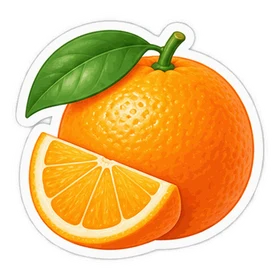
For orange, this picture represents the fruit. The same English word can describe a color. Make the meaning specific with an orange or peel an orange. You can check the fruit sense in the orange lesson.
2. Give the word a useful phrase
An image helps you start a conversation about a word. A phrase shows how you might use it. Try these combinations:
| Word | Useful phrase | Practice sentence |
|---|---|---|
| orange | peel an orange | I peel an orange after lunch. |
| coffee | a cup of coffee | I make a cup of coffee in the morning. |
| cat | feed the cat | I feed the cat before work. |
These sentences were written for this exercise. Change the details so they belong to you. If you do not have a cat, try “My neighbor has a cat” instead.

Notice a cup of coffee. When talking about the drink in general, English usually treats coffee as uncountable. You can use a container phrase to describe one serving. The coffee lesson has another everyday example.
3. Try recalling without the label
Look at the picture and cover the English label. Say the word, then say its phrase. After that, look away from both the picture and the word and try your sentence.
If you cannot remember, reveal the answer, check it, and try again after another word. Keep the collection small enough that you have time to work with every item. Three words are a starting point, not a daily quota.

4. Save a few words and return to them
In the Memi app, saved Gotcha words can become part of your flashcard learning collection. Follow the guided practice and, after learning, choose to continue with spaced review. Revisit a word when you want another attempt.
On this website, try the vocabulary collection and practice a word directly in Gotcha. Website progress stays in this browser; it does not sync with your app collection.
Let the sentence take you beyond the picture
Pictures work especially well as prompts for concrete things. For words such as habit or an expression such as figure out, add a situation and an example. You can explore habit or bring language from a video into the 15-minute YouTube routine.
Your next step can be small: choose one picture, learn its word, and say something true about your day.
Frequently asked questions
Are pictures enough to learn a word?
Use a picture as a starting clue, then add its pronunciation, meaning, and an example. One image may suggest several ideas, and one word may have several meanings. Practice using the word in a sentence so the label connects to something you can say.
How many Gotcha words should I start with?
Try three familiar words and see whether you have time to practice all of them. Adjust the number to your session. The useful question is whether you can recall a meaning and make a sentence, rather than how many pictures you can browse in a day.
Will website practice appear in my Memi app?
Gotcha practice progress stays in the browser you are using. It does not sync with the app. You can try the web collection as a small introduction; use the app’s own Gotcha and flashcards to build and practice your app collection.