Study together without turning focus into a video call
A good study together app should make another person feel present, not make you perform for a camera. Here is how to use quiet focus rooms for accountability while keeping your goal, pace, and attention your own.
Searching for a study together app usually begins with a very ordinary problem: studying alone is too easy to postpone. You sit down, open the chapter, then somehow answer a message, tidy a folder, and watch ten minutes disappear. Having somebody else nearby changes the atmosphere. Starting feels more real, and leaving feels a little less automatic.
But many online study spaces solve loneliness by creating a second problem. They ask for a camera, a microphone, a profile, a chat, or a constant sense that you are visible. Now part of your attention is spent checking your face, your room, and whether you look productive. A focus room should reduce friction, not become another place to perform.
The quieter alternative is simple: enter a shared room, state what you intend to finish, start your own timer, and work beside other people represented by a small presence or avatar. Nobody needs to speak. Nobody needs to study the same subject. The room supplies company; each person keeps control of the work.
What a study together app should actually provide
The useful part is not a crowded screen. It is a small agreement: we are here now, and we are each doing the thing we said we would do. Four ingredients are enough.
- Visible presence. You can tell that other people are in the room, even if nobody is broadcasting video.
- A concrete personal goal. “Review chapter 4” is easier to begin than “study chemistry.”
- A bounded session. A timer gives the work an edge. Forty minutes is something you can enter; “all evening” is fog.
- A clean ending. When the session finishes, you can mark the goal, rest, or choose another round instead of drifting into an endless feed.
Everything else is optional. Music, room themes, streaks, chat, and statistics can be pleasant, but they should sit around the focus loop rather than interrupt it. If it takes five minutes to configure a session, the tool has already borrowed too much attention.
Three kinds of online study room
“Study together” covers several different experiences. Choosing the right one depends on what normally stops you.
Video body doubling
A live camera can create strong accountability because another person is visibly working. It can help when you need a firm appointment or when beginning alone feels almost impossible. The cost is social energy: finding a presentable place, staying inside the frame, and being aware of another face. That is useful structure for some sessions and needless pressure for others.
Community study spaces
Large communities add channels, scheduled events, study groups, and conversation. They are good when you want friends, subject-specific help, or a recurring cohort. They are less useful when conversation is exactly what you are trying to escape. The boundary between “community” and “another inbox” matters.
Quiet presence rooms
A quiet room keeps only the signal that others are working. You join, choose a goal, and start. An avatar or occupied seat creates enough social presence to make the session feel shared, but there is no need to arrange your desk for strangers. This is often the best fit for a library-like feeling: company without conversation.
A useful test: after joining a room, are you thinking more about the task or more about the room? The right room should disappear into the background within a minute.
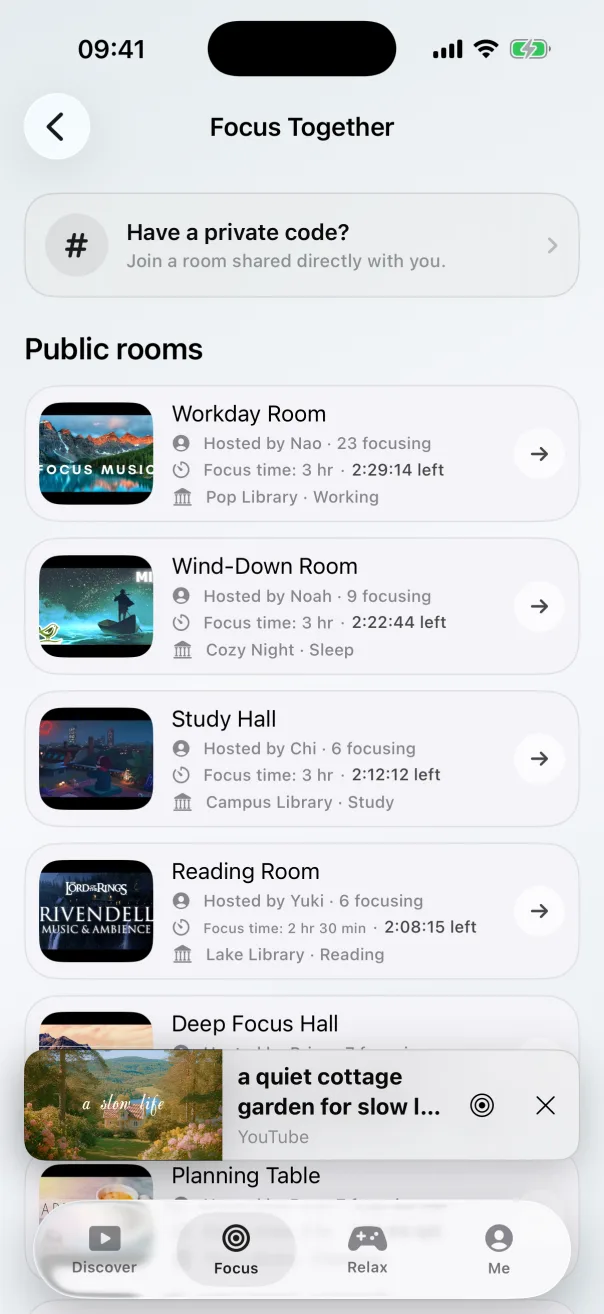
Why company can help even without conversation
Studying beside somebody changes a private intention into a visible action. The other person does not need to supervise you. Their presence is simply a cue: this is a place for starting, continuing, and finishing. It is the digital version of noticing that everyone around you in a library has opened a book.
This works best when the social signal stays light. You should be able to see that the room is active without reading messages every few seconds. You should be able to leave for water without explaining yourself. And you should be able to return to the same goal without treating an interruption as failure.
The goal is not to manufacture pressure. It is to make the next useful action more obvious than the next distraction. That distinction is important: pressure may carry one difficult night, while a low-friction ritual can carry an ordinary semester.
How to use a study together app without a camera
1. Write a finish line before choosing a timer
Start with an outcome small enough for one session: solve questions 1–12, outline the essay introduction, or review thirty flash cards. Then choose a duration that fits the outcome. A timer without a finish line measures sitting; a finish line tells you what the sitting is for.
2. Pick public or private based on the obstacle
Use a public room when you need immediate momentum. There is no scheduling, and seeing other occupied seats can be enough to begin. Use a private room when a friend is part of the commitment. Share the room code, agree on a start time, and let each person bring their own work.
3. Let everyone keep an independent timer
People rarely need identical sessions. One friend may have twenty minutes before class while another needs an hour for a problem set. A shared room can hold both. Synchronising every break sounds communal, but independent timers are more forgiving and make it easier to join late or continue after somebody leaves.
4. Make the room quiet on purpose
Put the phone where the timer is visible but not inviting. Choose one ambient sound if it helps, then stop adjusting it. If a thought unrelated to the task appears, write it on a scrap list and return. The room is a context, not entertainment.
5. Close the session with one sentence
Record what finished and what comes next: “Questions 1–9 done; begin with question 10.” This tiny handoff prevents tomorrow’s session from spending its first ten minutes reconstructing today. If the session was interrupted, resume it rather than discarding the work already done. I use the same rule in my broader system for focus sessions that survive a real day.
Public room or private room?
A public room is closer to walking into a library. You do not know who will be there, and that is fine; the shared purpose matters more than identity. It is ideal for an unplanned session, especially when waiting for a friend would become another reason not to begin.
A private room is closer to reserving a study table. It works well for classmates, partners, or friends in different time zones. The room code keeps entry simple, and each person can work on something completely different. You can agree to check in at the end without keeping a conversation open throughout the session.
Neither is inherently more productive. Pick the one with the lowest setup cost today. If the room becomes a ceremony, it is too elaborate.
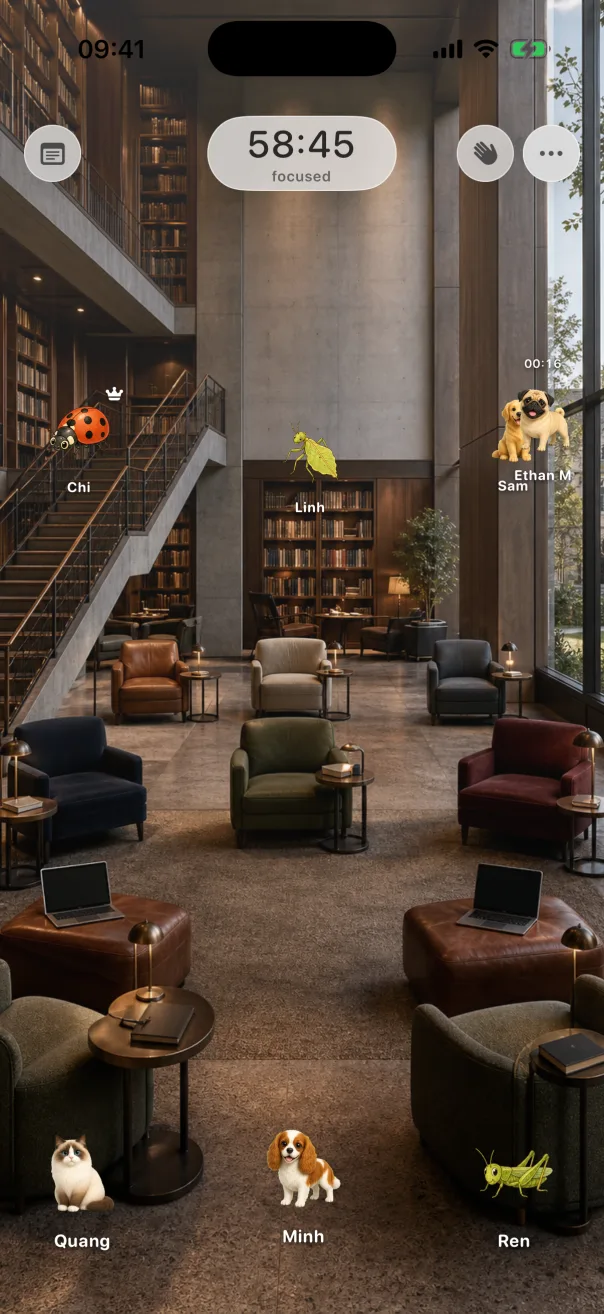
How Lume Flow handles quiet focus rooms
I built Lume Flow around this quieter interpretation. You can enter a public room for study, work, or reading, or create a private room and invite somebody with a short code. People appear through the room and their avatars rather than live video. Each person can bring a different goal and work at a different pace.
The rooms also sit beside the parts of a focus session that happen before and after: a flexible timer, ambient scenes, short breaks, and a journal for thoughts worth keeping. Those pieces are useful only when they stay subordinate to the work. The shortest path remains: choose the room, name the goal, start.
Common questions about studying together online
Is there a study together app that does not require a camera?
Yes. Look for tools described as quiet focus rooms, virtual libraries, or presence-based coworking. Check whether video is optional before joining. Lume Flow uses spaces and avatars, so studying together does not require a camera feed.
Can two friends study together if they take different subjects?
Absolutely. The shared commitment is time and presence, not content. One person can read history while another writes code. Say your individual goals at the beginning and decide whether you want a brief check-in at the end.
Do our timers need to be synchronized?
No. A synchronized timer can be pleasant for a planned group session, but independent timers handle real schedules better. The room can remain shared while each person starts, pauses, and finishes when needed.
Are public rooms useful for body doubling?
They can provide the lightest form of body doubling: another person is present and working, but there is no direct supervision. If you need stronger accountability, invite a friend to a private room and agree to share the result at the end.
Choose presence, then make it disappear
The best study together app is not the one that demands the most attention. It is the one that helps you cross the small distance between intending to study and actually beginning, then becomes quiet enough for the work to take over.
Start with one modest goal and one bounded session. Join a public room now, or send a private room code to a friend. Keep the camera off, let the room feel occupied, and give the next forty minutes to the thing you came to do.
Written by Roach
I’m a product engineer who loves making useful things and telling the stories behind how they’re built. Honest build notes, product thoughts, and engineering lessons.